How to install IPTV Smarters on Firestick? [Updated 2026]

IPTV on Firestick

For those looking to enhance their Firestick experience, knowing how to download IPTV Smarters on Firestick is essential. This guide will walk you through each step of the process, ensuring you can install and use IPTV Smarters on your Firestick without difficulty. A guide on how to use IPTV Smarters on Firestick is also included.

What is IPTV Smarters?

Before diving into installing IPTV Smarters on your Firestick, let’s look at what IPTV Smarters is and how it can transform your streaming experience. IPTV Smarters isn’t just an ordinary app; it’s a powerful tool that acts as a gateway between your IPTV service provider and your streaming device, delivering a smooth and optimized viewing experience.

IPTV Smarters: An Overview

IPTV, or Internet Protocol Television, is a system where television services are broadcast via the internet protocol suite over a packet-switched network, such as the internet, instead of traditional terrestrial, satellite, or cable broadcasting methods.

IPTV Smarters is an IPTV player that lets you stream content from your IPTV subscription. Simply put, the app acts as a bridge, allowing you to enter your IPTV service credentials and access content on your preferred device, including Firestick, smartphones, tablets, and smart TVs.

IPTV Smarters Versions

IPTV Smarters is a versatile application available in several versions: IPTV Smarters, IPTV Smarters Pro and IPTV Smarters Lite, each tailored to different user needs and preferences.

  • IPTV Smarters : The standard version which offers all the basic features for watching IPTV content.
  • IPTV Smarters Pro : The premium version of the application, offering more features and improved performance.
  • IPTV Smarters Lite : A lighter and simplified version, ideal for users who want an easy-to-use and compact IPTV player.

IPTV Smarters: Security

When used correctly, IPTV Smarters is considered secure. The application itself does not stream or host any content; it simply allows content to be streamed from your IPTV provider.

However, the security of the content you access depends entirely on the reliability of your IPTV provider. To avoid any legal or security risks, it is essential to choose a reputable IPTV provider. Furthermore, using a VPN can enhance your security and protect your online privacy while watching content.

How to download IPTV Smarters on Firestick

An important fact to know before installing IPTV Smarters on Firestick is that the app is available on Google Play and the Apple App Store, but not on the Amazon Appstore. Therefore, you will need to sideload the app onto your Firestick. Here is a detailed guide to downloading IPTV Smarters Pro on Firestick.

Tips for finding apps on Firestick

When searching for an application to download on Firestick, constantly using the left, right, up, down, and OK buttons on the remote can become tedious.

Dream TV recommends a handy tip for speeding up text entry. The Firestick remote control app has a keyboard feature that lets you type letters and numbers as smoothly as on a physical keyboard.

Here’s how:

  1. When your Firestick and smartphone are connected to the same Wi-Fi network, launch the application.
  2. Tap the icon in the upper right corner, choose your Firestick and tap the  Connect pop-up  button.
  3. Press the  Keyboard.  Press the button and you will see a keyboard.

Get Downloader on Firestick

The downloader is an essential tool for anyone looking to maximize their Firestick experience by accessing a wider range of apps and content. It’s a popular assistant that makes it easy to download files from the internet to your Amazon Fire TV or Firestick. It’s especially useful for installing third-party apps that aren’t available on the Amazon Appstore.

Getting Downloader on Firestick means getting YouTube TV on Firestick. Here’s how:

Step 1.  Press the  Home  button on your Firestick remote or remote control app and choose the  Find  icon on the home screen.


Step 2.  Type  Downloader  in the search bar and follow the on-screen instructions to install it.


Step 3.  Enable Developer Options on Firestick, which allows you to download third-party applications from Downloader:

  1. Return to the home screen by pressing the  Home  button.
  2. Go to  Settings  >  My Fire TV  >  Developer options .
  3. Select the ”  Applications from unknown sources”  application from the list of applications and disable ”  On” .

Install IPTV Smarters Pro on Firestick

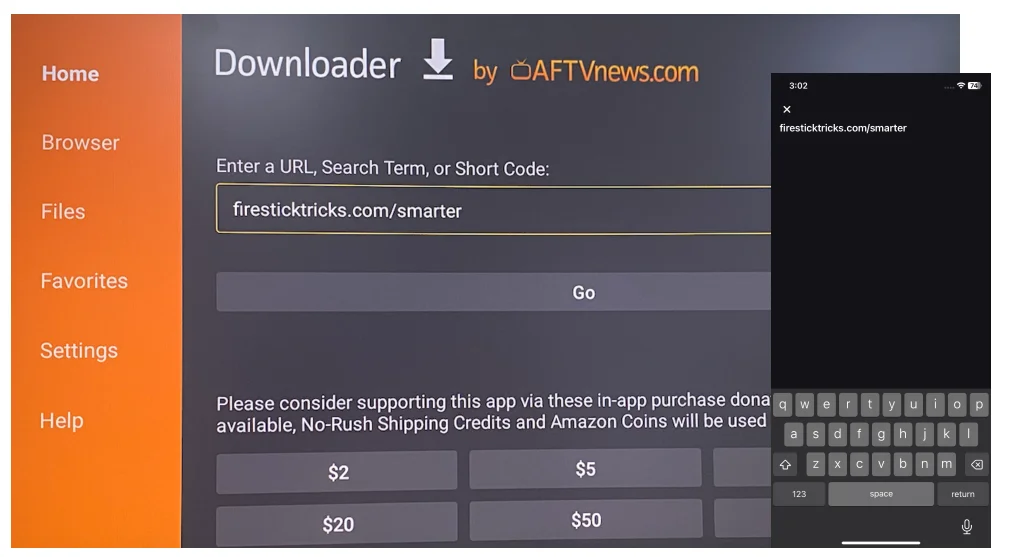
How do I search for IPTV using a Firestick remote? You need to enter a specific path in the URL box on the downloader screen. The path consists of many letters and symbols, and using the remote app instead of the remote saves you a lot of time.

Step 1.  Open the Downloader app on your Firestick. If this is your first time running this app, you will be greeted by a series of messages. Ignore them until you see the next screen.


Step 2.  Enter  firesticktricks.com/smarter  in the URL box using the remote application and choose the  Go  option.
Download IPTV Smarters Pro for Firestick

Step 3.  Your Firestick should begin downloading the IPTV Smarters APK file, which may take several minutes. Select the Install option once the download is complete and wait for the installation to finish.


Step 5.  When you see the prompt indicating that the application is installed, choose  Done  to delete the APK file (it is highly recommended to  free up storage on your Firestick ) or choose  OPEN  to start with IPTV Smarters on your Firestick.


How to use IPTV Smarters on Firestick?

After installing IPTV Smarters Pro on your Firestick, you can find the app in the app menu. If you use the app frequently, it’s best to move it to the top of your app list.

To do this, when IPTV Smarters is selected, press the menu button (three horizontal lines) on the Firestick remote, choose  Move Forward , and press  OK  to save.


Next, you can launch IPTV Smarters from the home screen without accessing the applications menu. You will see the device options window where you need to keep the  TV  option selected and choose  Save .

When prompted, accept the terms and conditions to continue. Next, you will be presented with a prompt offering different options:

  • Upload your playlist or file/URL
  • Connecting with the Xtream Codes API
  • Upload your data from the device
  • Play a single stream
 

This cannot be ignored. IPTV Smarters only facilitates the streaming of content from an IPTV service provider; it does not host or provide any content of its own. In other words, you must have an active subscription with an IPTV service provider; without a subscription, you will not be able to access any content on the application.

Make sure your IPTV service supports M3U playlists so you can use it with the app if you choose “Load your playlist or file/URL”. Then, follow the on-screen instructions:

  1. Allow the application to access your photos, media, and files on your Firestick.
  2. Enter the playlist name.
  3. Choose  M3U URL  as the playlist type.
  4. Type the M3U URL (the URL should be contained in the email sent by your IPTV service provider).
  5. Select  Add a user .

The M3U URL is often long, so we recommend using the remote application for easy entry. Alternatively, you can choose “Connect with Xtream Codes API” to add a user without this issue. The Xtream Codes API is also included in the email from your IPTV service provider.

Once you have entered your IPTV subscription details, you can start exploring the application and streaming content.

Alternatives to IPTV Smarters

There are other good options for streaming IPTV content, and one of them is  BoostVision’s IPTV Player  . Similar to other IPTV players, BoostVision’s IPTV Player offers a simple and convenient way to watch live TV, on-demand videos, and other IPTV services on your devices, such as Android platforms.

Which alternative to IPTV Smarters includes:

  • User-friendly interface: The application offers a clean and intuitive interface, allowing you to easily navigate and find the content you want to watch.
  • M3U playlist support: The application is compatible with any M3U playlist and several web streaming formats.
  • Playlist management: The application allows you to manage your IPTV playlist, enabling you to organize and personalize your viewing experience.
  • Favorites function: the application allows you to create a list of favorite channels and content for quick and easy access.

If you are interested in the IPTV player, install it on your Android device and follow the application’s instructions to enjoy the entertainment the application offers.

Conclusion

IPTV Smarters is a versatile and powerful tool for anyone looking to enhance their IPTV viewing experience, offering a complete solution for managing and streaming IPTV content. Downloading IPTV Smarters Pro on Firestick might seem complicated, but by following these steps, you can easily sideload the app onto your Firestick and start enjoying a wide range of IPTV content. Remember to have an active IPTV subscription and use a VPN to enhance your security.

How to download IPTV Smarters on Firestick: FAQ

What is IPTV Smarters?  

IPTV Smarters is an application that allows users to stream IPTV content from their IPTV service provider to various devices, including the Firestick.
 

Can I download IPTV Smarters directly from the Amazon Store? 

No, IPTV Smarters is not available on the Amazon Store. You will need to sideload the application using an alternative method such as a downloader.
 

3. What is sideloading? 

Sideloading involves installing an application on a device from a source other than the official app store. In the case of IPTV Smarters, this means downloading the application from outside the Amazon Store.
 

4. How can I download IPTV Smarters on Firestick?  

To download IPTV Smarters on Firestick, you need to use an application like Downloader. Here are the general steps:
   – Install the Downloader app from the Amazon Store.
   – Enable the “Applications from unknown sources” option in your Firestick settings.
   – Use Downloader to access the IPTV Smarters APK file URL and proceed with the installation.
 

5. Do I need an IPTV subscription to use IPTV Smarters?

Yes, IPTV Smarters does not offer content itself. You need an active subscription with an IPTV provider to stream content through the application.
 

6. Do I need to use a VPN with IPTV Smarters on Firestick?  

It is highly recommended to use a VPN when using IPTV Smarters. A VPN protects your privacy by masking your IP address and securing your connection, especially when using IPTV services.
 

7. Which versions of IPTV Smarters are available?

There are several versions: IPTV Smarters, IPTV Smarters Pro, and IPTV Smarters Lite. The Pro version offers more features, while the Lite version is simpler for quick and easy use.
 

8. Is installing IPTV Smarters on Firestick legal?  

Yes, the IPTV Smarters app is legal. However, make sure your IPTV subscription comes from a legitimate source to avoid legal issues.
 

 9. What to do if IPTV Smarters is not working properly on Firestick? 

If the application is not working properly, you can try uninstalling and reinstalling the application, clearing the cache, or checking if your IPTV provider is experiencing any issues.
 

You can also see how Smart IPTV works.

Bright4K — The Best IPTV Subscription 2026. 36,000+ Channels · 80,000 VOD · Free 24h Trial · Trusted by 900,000+ Customers

Bright4K: Your premium, high-quality IPTV service, uninterrupted, at the best value, with 7-day-a-week online support. Over 36,000 international channels, sports, and movies. 24-hour and 48-hour IPTV trial available, test code included before purchase.

Premium IPTV subscription compatible with Smart TVs: LG, Samsung, Sony, Thomson… | IPTV subscription for MAG devices | IPTV subscription for M3U and Android TV Boxes, Kodi and VLC | IPTV for smartphones and tablets | IPTV subscription for PCs, Macs, and computers | IPTV for ENIGMA2

Ultra-secure payment via PayPal (Visa, MasterCard, CB) and Western Union

Minimal Credit Card Icons