Smart TV Samsung / LG or Amazon Fire Stick
IPTV Smarters (Smartphone, Android Box)
MAG 254, 410, 322 ...
PC / MAC (VLC)
Smart TV Samsung / LG or Amazon Fire Stick
Install and activate the Smart IPTV app for your Samsung Smart TV
Smart IPTV , often called Smart IPTV, is an IPTV player with an EPG (Electronic Program Guide) that allows you to easily access your chosen IPTV channels. However, as stated on the official website, Smart IPTV does not include any pre-installed channels : you must add your own channels via an IPTV subscription. Some people mistakenly believe the application already comes with channels, but this is not the case.
To fully enjoy the application, you need to add your channels . Before doing so, you need to know how to install SMART IPTV on your devices , as some configuration is required.
On some devices, installation is as simple as installing an app on a smartphone, but on other platforms, it requires a bit more work. Furthermore, not all platforms are compatible, so check the list of devices compatible with Smart IPTV before you begin.
Setup instructions for Samsung/LG Smart TV or Amazon Fire Stick
The www.bright4k.com service uses a media control application called “Smart IPTV” . This application is free for 7 days , after which a one-time donation of €5.49 is requested to support the application’s development.
How do I configure Smart IPTV on a Samsung Smart TV?
Check compatibility
Access the app store on your Samsung / LG Smart TV or Amazon Fire Stick.
Search for Smart IPTV .
If the application does not appear, look in “All applications” or “Updates” .
Launch the Smart IPTV application
Note the MAC address displayed on the screen.
Add your Bright4K subscription
Visit http://siptv.eu/mylist/ from any browser.
In the “Add external playlist links (URL)” section , enter your MAC address and the URL of your www.bright4k.com subscription in the “Link” field .
Check that the Country dropdown menu is set to “Various” .
Check Stay Online .
Click on Add Link .
Restart the Smart IPTV app or your TV.
Access channel groups
Press the blue button on your remote control to navigate through the channel groups.
Step 1 – Download Smart IPTV on your TV
(Only for Samsung and LG Smart TVs)
Go to your TV’s app store
Search Smart IPTV
Install the application and open it
Your MAC address now appears on the right side of the screen.
Step 2 – Add the channels to Smart IPTV
Go to www.siptv.eu/mylist/
Add your MAC address and the M3U subscription URL
Click on Add Link
Important notes:
A yellow star means the channel is in your favorites folder. To add it to favorites, press OK on the remote control.
Once your subscription is activated (maximum 4 hours), the channel list will appear on your device.
Select a group and then a string .
To change channels, simply enter the channel number on the remote control.
Red button : add to favorites (or long press OK on Android)
Blue button : access groups (or long press OK on Android)
IPTV Smarters (Smartphone, Android Box)
IPTV Smarters Pro is one of the best IPTV apps for playing M3U streams. The app is free and also available on iOS (iPhone, iPad, Apple TV). Its interface is simpler than other apps like GSE Smart IPTV.

DOWNLOAD IPTV SMARTERS PRO
You can find IPTV Smarters Pro on the Play Store , or download the APK file directly .
How to easily set up your IPTV subscription
In this article, you’ll learn how to install the IPTV Smarters app to use your Smart IPTV subscription. Personally, I find this app perfect and I use it on my X96 Mini Android Box . You’ll find more details about this excellent app below.
Features of the IPTV Smarters application:
Easy to use with an intuitive interface
Organizing playlists by channel and VOD , channel replay, EPG timeline
Search for channels and VOD content
Includes 2 built-in players and allows the use of VLC or MX Player as external players
EPG (TV guide) and automatic channel logos
VOD information: synopses , film and series posters, ratings
Favorites list
Subscription information: status, expiry date, etc.
Works without M3U (thanks to the Xtream-Codes API )
French language included
How to use an M3U link to configure IPTV Smarters Pro
If you already have an M3U link , no problem: you can extract your information as follows:
Username
Password
Server URL
This information is included in the M3U link provided with your order .
Example of an M3U link:
From this M3U link, the server connection information is:
Username: abffef5667
Password: abCD12345
Server URL: http://host-du-serveur.com:58901

MAG 254, 410, 322 ...
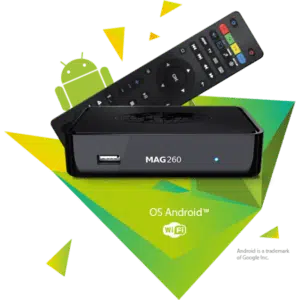
A MAG decoder is an IPTV set-top box that allows you to receive and stream video and audio signals without storing them . It is often used by internet and TV service providers. ✅
In other words, this box allows you to receive the TV channels you want to watch without storing them on your television and without installing a satellite dish on your roof or in your apartment.
The high-performance MAG cases feature the ultra-fast STiH207 processor and a large RAM capacity.
Easy to use, these decoders allow you to:
Receive various TV channels
Watch streaming movies
Read files offline from a USB port
How to install IPTV on a MAG box
Go to: Settings → System settings → Servers → Portals
Portal Name 1: IPTV Store
Portal URL 1: Check your email for login details
Portal Name 2: Leave blank (only fill in if you have ordered a second subscription)
Portal 2 URL: leave blank (only fill in if you have ordered a second subscription)
Save all settings
Restart the device
Once the box has restarted, wait for the TV screen to display the channels .
PC / MAC (VLC)
IPTV with VLC is a media player that allows you to easily play M3U files on your PC. It’s one of the best options for using your M3U links . To access it, follow these simple steps. ✅
The installation is very easy and the file is small (33 MB) .
Make sure that VLC Media Player is installed on your device.
If not, download it for free.
Choose the version compatible with your device: VLC for Windows or VLC for Apple .
Once installed, you can set up an M3U playlist or an automatically updated M3U list (like the one provided by your Bright4K IPTV subscription) to watch Italian, Turkish, German, French, Spanish, Greek and many other channels.
Simply click on Play and wait a few minutes for the channels to load.
Once loaded, double-click on the channel of your choice to watch your favorite programs.
With IPTV for VLC , you can enjoy thousands of channels worldwide in HD .
⚠️ Note: Using the same link on 2 devices simultaneously may block it.
HOW TO WATCH IPTV ON VLC
Open VLC Media Player
Go to Media → Open Network Stream
Add the IPTV subscription M3U URL we sent you and click Play
Wait for all channels to load (this may take a few minutes)
Choose a channel and enjoy the program
HOW TO AVOID AUTOMATIC CHAIN CHANGE
Automatic chain change is a common problem with this system. It can be easily fixed:
Open your IPTV M3U link in VLC
Double-click the button indicated in the instructions
That’s all! ✅
Important :
Free demo M3U links only last 1 to 3 days.
You may notice small image jumps every 30 seconds , so it is necessary to regularly download new links .
For a more stable solution , it is recommended to purchase official subscriptions from legal providers .